Hosted platform · SharePoint
It says FINAL.
What changed?
Excel change review for the SharePoint library your team already saves to. Every new version of a watched workbook is compared against the one before it, so the change gets discussed on the cell it touched and signed off by someone whose name is on the record.
Free add-in live on Microsoft AppSource · Sponsor of EuSpRIG 2026, the European spreadsheet-risks conference
Before the model goes into the pack
One model, one Friday-afternoon save, one deadline. Two analysts run the same week, one desk apart. Tell us which week sounds familiar.
The first analyst
Inbox, Teams and memory
The second analyst
The same SharePoint library, connected to  SheetDelta
Friday, 4:51 pm
The first analyst
The model lands at ten to five with the filename FINAL_v4_JK(2).xlsx. There’s already a FINAL_v4.xlsx and a FINAL_v4_JK.xlsx, and nobody can tell me how the three relate. I write back and ask what changed.
The second analyst
The same save, one desk over. By the time I’ve made coffee, the new version is sitting in SheetDelta, already compared against the last one. I read the changed cells, not the workbook.
Friday, 5:24 pm
The first analyst
The answer comes back: just updated the assumptions. Which assumptions? On which sheets? The person who knows is driving home.
The second analyst
One change stands out: the FY29 revenue forecast is a typed-in 2,500 where a formula used to be, and the scan flagged it before I got there. I ask about it on the cell itself, so the answer gets written down where the number lives.
Scan a workbook for risks, free →Tuesday
The first analyst
It turns out we both had it open on Monday. Now there are two files, each with real work in it, and I spend the afternoon retyping one into the other and hoping I don’t fat-finger a cell on the way through.
The second analyst
We both had it open here too. SheetDelta’s Combine takes our two copies back to the version they both came from and shows me the differences, group by group. I approve each one. Nobody retypes anything.
Thursday
The first analyst
The churn argument is now happening in three places: a Teams thread, an email chain with a screenshot, and a cell comment on the wrong sheet. The approval, when it finally comes, is a reply-all that says fine by me. Fine about what? There are three attachments on that thread.
The second analyst
The model carries its own rules here, and one of them says capex stays inside the approved envelope. Thursday’s version breaks it, so the change can’t be signed off until someone deals with it. Nobody had to catch that by eye. When it clears, sign-off takes two people, and neither of them can be the author.
Spreadsheet governance →Sunday
The first analyst
The pack goes out tomorrow morning. So it’s me, a second monitor and fifteen sheets, checking the model cell by cell against my memory of what it looked like last month. My memory.
Two quarters later
The first analyst
A board member asks why the revenue forecast goes flat in FY29. It’s that typed-in 2,500. Nobody remembers typing it, nobody remembers accepting it, and there’s nowhere to look it up.
The second analyst
The board member asks the same question here. The 2,500 has a thread on it: who typed it, why, who accepted it, dated the week it happened.
Track changes in Excel →March
The first analyst
The auditor asks one question: who approved the change to the revenue build? I open Outlook and start searching.
Neither analyst got smarter, and neither stopped being responsible for the numbers. The difference is that one of them never has to reconstruct what happened.
Run your next model week like the second analyst.
Sign upTry the same engine on your own files
The second analyst’s week runs on this engine, compiled to WebAssembly. Pick two versions of one of your own workbooks and it runs in this tab, so neither file leaves your computer. No account. There is a worked example if you have nothing to hand.
The earlier version
Drop the workbook here, or browse
The later version
Drop the workbook here, or browse
No files needed. A sample SaaS operating model and DCF, before and after a re-forecast.
Reads .xlsx, .xlsm, .xlsb, .xls, .xltx, .xltm and .xlam, up to 50 MB a file. It runs the same engine as the platform: formula logic, inserted and deleted rows, sheets, named ranges, charts, pivots, validations, styles, and 87 risk rules. It reports that a macro changed without showing you the source. The macro source, the formula inspector and CSV export are on the hosted platform. A free Excel add-in on Microsoft AppSource runs the same checks in a task pane, without leaving Excel.
Hosted platform
Excel change review, from saved version to sign-off
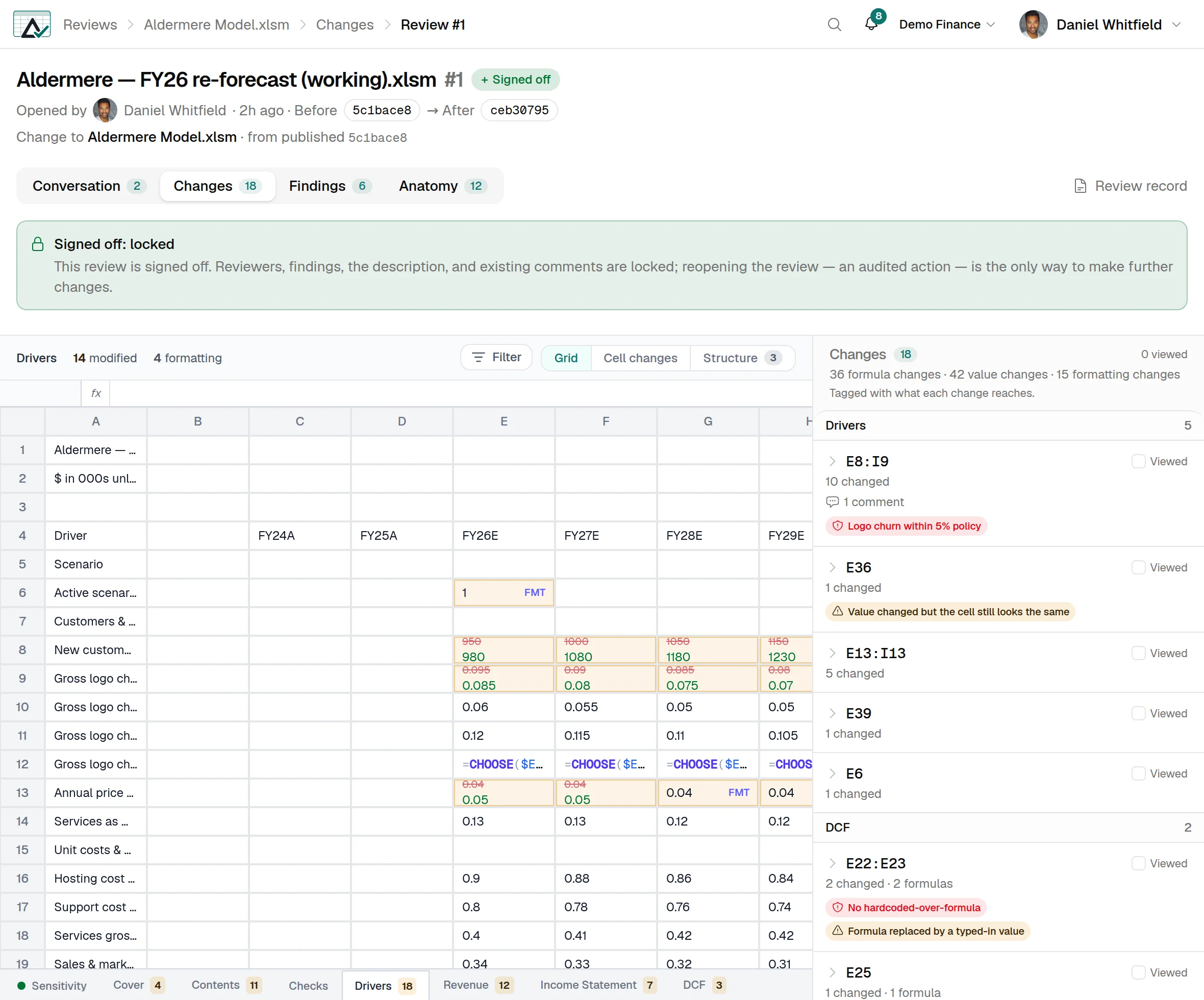
Two screens from the hosted platform, both on our 15-sheet demo model. They are separate reviews, so their counts do not line up with each other. The full walkthrough, from connecting a library to the printed record, lives on the platform page.
-
What changed, cell by cell. The old value sits struck through above the new one, in the cells where they live. Formulas keep their highlighting. An edit that only changed a format carries an FMT badge so it does not inflate the count, and each sheet tab shows its own. The panel on the right groups the change into ranges and says what each one reaches. -
The record it prints to. Every signed-off review prints to one page: who opened it and when, the SHA-256 of both versions compared, what changed by kind and by sheet, and the decision. You can hand it to whoever asks what happened to the model.
Screenshots of the hosted platform. The workbook is our demo model, and no customer data appears anywhere on this site.
The assistant said it changed the assumptions
An assistant that submits a version through the platform says what it did. SheetDelta checks that description against the cells that moved, and names the ones it did not mention. It signs in over OAuth under the permissions of the person who connected it, and everything it does lands in the same audit trail as everything a person does.
SheetDelta for AI agents →What it costs
The browser tool and the Excel add-in are free. The platform is $29 per user per month for Team, from $49 for Team Plus & Business, and self-hosted on an annual contract.
Frequently asked questions
Do my files get uploaded?
We already have SharePoint version history. Why do we need this?
Does anyone have to change how they work?
What happens after I sign up?
What does it cost?
Popular Excel comparison tools
Free, in your browser. Pick whichever matches what you came looking for.
Drop in two workbooks and see every changed cell, formula and sheet. Free, in your browser.
Match sheets and rows even after they move, so inserts don’t drown the real changes.
A diff for Excel that reads formula logic and structure instead of comparing lines of text.
A modern, cross-platform alternative to Microsoft Spreadsheet Compare.
Compare two .xlsx workbooks without opening Excel or installing anything.
See macro and formula changes in macro-enabled workbooks.
Give one workbook a review process
Connect the SharePoint library your team already saves to, and the next version that lands gets compared, discussed and signed off.
