Free · No upload · No account
Compare two Excel files and see every change
Drop an old workbook and a new one. SheetDelta shows every changed cell, formula, sheet and structural edit, right in your browser, with nothing sent to a server.
The earlier version
Drop the workbook here, or browse
The later version
Drop the workbook here, or browse
No files needed. A sample SaaS operating model and DCF, before and after a re-forecast.
What SheetDelta catches
Every changed cell
Values and formulas, added and deleted, highlighted in the cells they belong to.
Formulas as logic
Compares the meaning of a formula, so a reference that shifted when you inserted a row is shown as a real change.
Inserted & deleted rows
Detects structure, so adding one row at the top doesn’t report every row below it as changed.
Sheets & names
Catches added, removed, and renamed worksheets and named ranges across the whole workbook.
Save-noise immunity
Ignores the cosmetic churn Excel writes on every save, so opening and re-saving a workbook does not produce a list of edits.
Nothing uploaded
Both files are read and compared in your browser. They never travel to a server, so there’s nothing to leak.
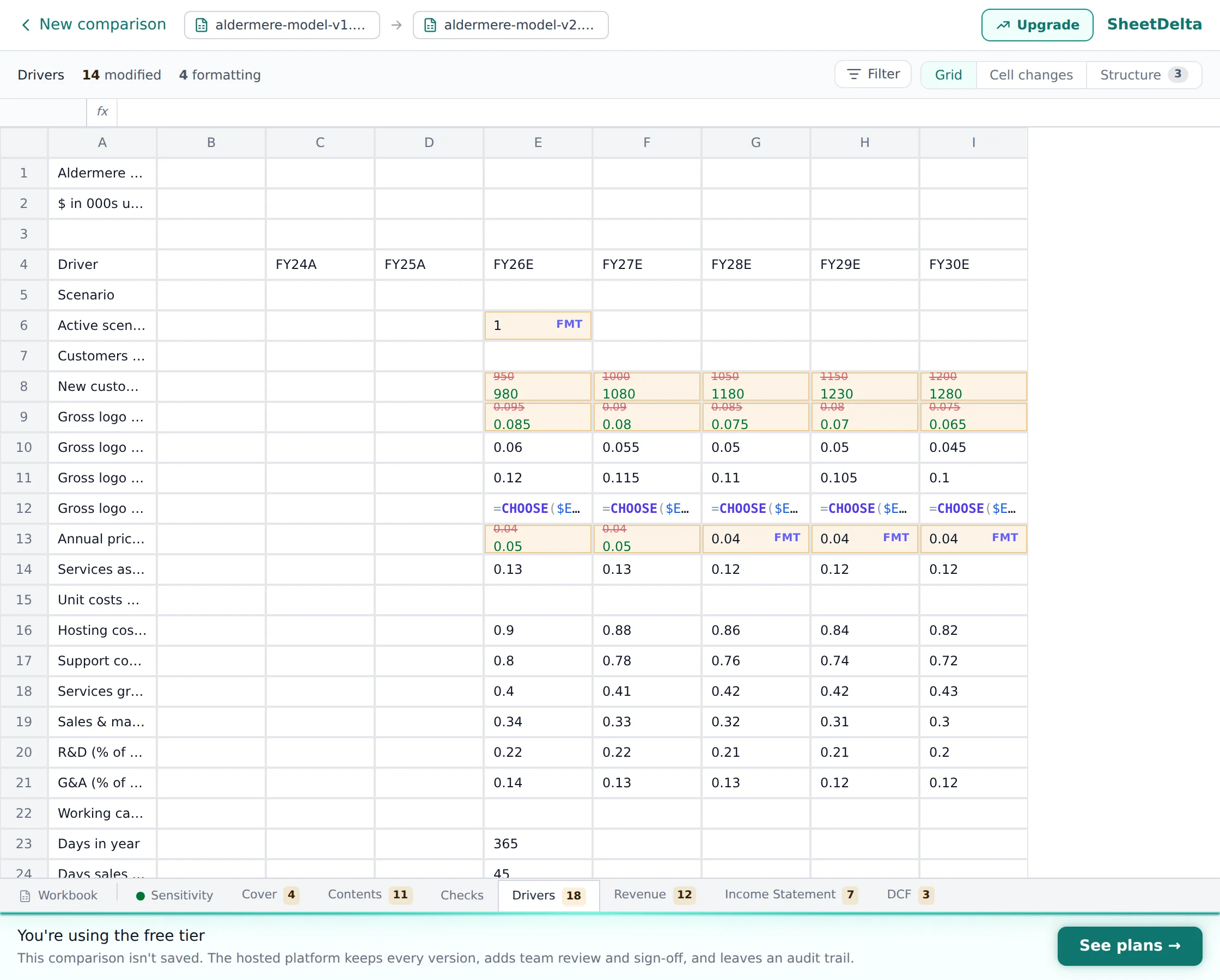
How to compare two Excel files
- 1.
Drop your original workbook into the left slot and the new one into the right.
- 2.
SheetDelta reads both files in your browser and runs the comparison there. No upload, and no waiting on a server.
- 3.
Read the result: green for added, red for removed, amber for changed, sheet by sheet.
No install, no macros to paste, no formula to write. If you’ve been doing this with
=Sheet1!A1=Sheet2!A1 and conditional formatting,
this is the same job in one drag.
Why a real Excel comparison beats a text compare
A spreadsheet isn’t a text file. Open an .xlsx and you’ll find a zip of XML, where one inserted row, a recalculated value, or a re-saved style can rewrite half the file without changing anything you care about. Generic “compare two files” tools drown you in that noise.
SheetDelta understands the workbook: it aligns sheets and rows, reads formulas as logic, and
filters the cosmetic churn, so what is left is the handful of changes that matter.
That’s the difference between “these files are different” and “the discount rate in
Assumptions!B12 went from 8% to 9%.”
Frequently asked questions
Is it free, and do I need an account?
Do my files get uploaded anywhere?
What file types can I compare?
Will inserting a row break the comparison?
How big can the files be?
Can I compare two versions of the same file over time?
More Excel comparison tools
Match sheets and rows even after they move, so inserts don’t drown the real changes.
A diff for Excel that reads formula logic and structure instead of comparing lines of text.
A modern, cross-platform alternative to Microsoft Spreadsheet Compare.
Compare two .xlsx workbooks without opening Excel or installing anything.
See macro and formula changes in macro-enabled workbooks.
Formulas, conditional formatting, Power Query, and the one-click tool.
The manual methods, their limits, and when you need a real change list.
Comparing the same workbook every week?
Let SheetDelta watch your SharePoint files, keep the history, and route each change for review.
